ysa-lds.org
How people agree to texts
This page sets out the complete consent experience for the Ward Appointments text messaging programme operated by YSA-LDS LLC: who is asked, the exact words they are shown, and a screenshot of each screen.
It exists because the two screens themselves sit behind a ward's own access question. Ward Appointments is used by the members of one congregation, not by the public, so those pages are not open to everyone — which is why the consent experience is reproduced here in full instead.
The programme in one paragraph
Around a booked appointment with a bishop, YSA-LDS LLC sends a small number of transactional text messages: a one-time verification code and one reminder to the member who booked, and one check-in afterwards to the ward's on-duty executive secretary asking whether the appointment happened. There is no marketing or promotional content of any kind.
1. A member booking an appointment
You can open this screen yourself. It needs no password, no account and no ward code: ysa40.wms.ysa-lds.org/website/appointments → choose any member of the bishopric → choose any appointment type. The next screen is the one shown below. Nothing is sent and nothing is recorded until somebody enters a contact detail and presses Continue.
Where: the member opens their own ward’s website, goes to the Bishop page and taps Make an appointment. They choose who to meet and what about, and then reach the “Who are you?” step.
How they say who they are. They type the mobile number or email address their ward already has for them. No list of the ward’s members is shown — a page that published the roster would be a directory anyone could read — and a code is sent to that detail to prove it is theirs. A contact that matches nobody is answered exactly as one that matches, so the page cannot be used to find out who is in the ward.
The text-message box appears once what they have typed looks like a phone number, because a text is the only thing a number can be sent. It is unticked by default. Its exact wording:
Yes, text me a one-time verification code and an appointment reminder at the mobile number I enter on this form. Texts come from ysa-lds, llc at (801) 994-0858. Message frequency varies. Msg & data rates may apply. Reply STOP to opt out, HELP for help. SMS Terms: https://ysa-lds.org/sms-terms.html Privacy Policy: https://ysa-lds.org/privacy.html
The number the agreement is recorded against is the one in the field above the box — what they are consenting for is the number in front of them, not one held out of sight. It has to be the mobile number their ward already has on file, which is what makes the code proof of who they are, and the page never displays what the ward holds, so a wrong entry reveals nothing.
Directly beneath it, the page says: “Optional — without it, we'll email your code and reminder instead.” The wording links to the SMS terms and the privacy notice. A member who leaves the box unticked still books their appointment online and is never texted; a member who gives an email address instead is never texted either.
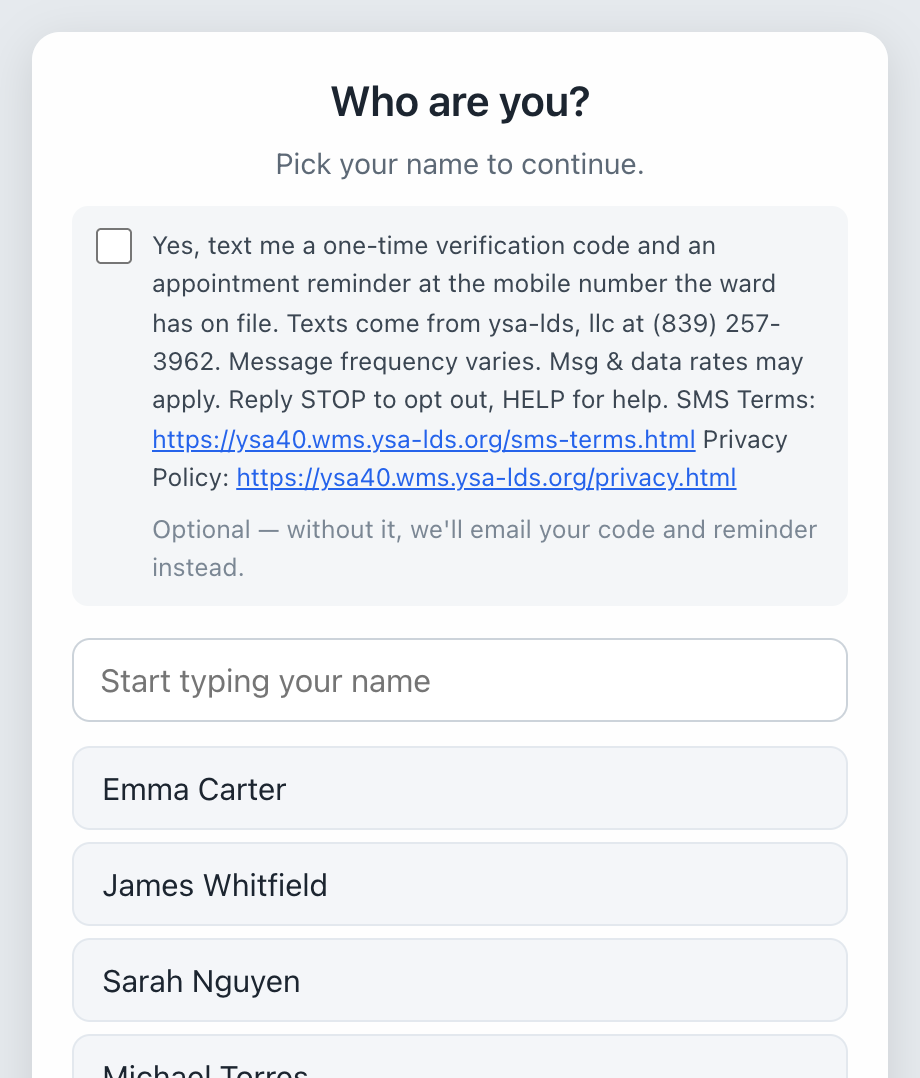
The member opt-in, as it appears on the booking page. The box is unticked until the member ticks it; it is shown ticked here so it is legible, and the number in the field is an example.
2. The ward's on-duty executive secretary
Where: the executive secretary — a volunteer ward leader — signs in to his ward's leader application, opens Mtgs w/ Bishopric, and taps Get these by text instead. A consent screen appears with a checkbox that is unticked by default, and he must tick it and press Agree.
The exact wording of the checkbox:
I agree that ysa-lds, llc may text me at [his number] from (801) 994-0858 while I am on duty, asking whether ward appointments took place, which I answer by replying Y or N. Message frequency varies: about one text per appointment while I am on duty. Msg & data rates may apply. Reply STOP to opt out at any time, HELP for help. SMS Terms: https://ysa-lds.org/sms-terms.html Privacy Policy: https://ysa-lds.org/privacy.html
Without that agreement, the same check-ins are sent to him by email.
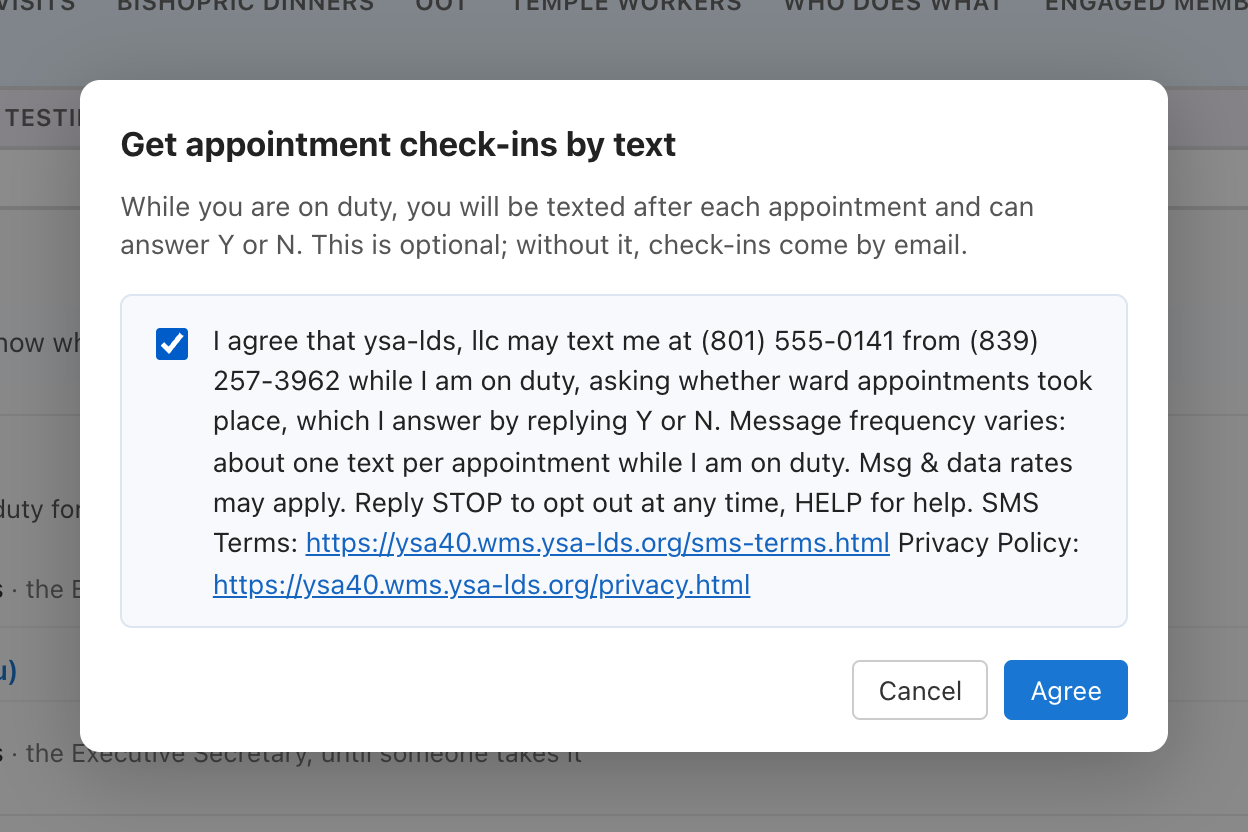
The executive secretary's consent screen.
What is sent
- Verification code — “YSA-LDS LLC: [code] is your code to confirm an appointment with [bishop name] ([ward name]). It expires in ten minutes.”
- Appointment reminder — “This is a reminder of your appointment with [bishop name] on [date and time] at [location]. [instructions from the bishop]”
- Check-in to the on-duty secretary — “Did [member name] meet with [bishop name]? [appointment type], [date and time]. Reply Y if it happened or N if not.”
Opting out, and what we never do
- Reply STOP at any time to stop all messages; HELP replies with how to get help.
- Every agreement is recorded with the time, the number, and the exact wording shown.
- We do not share, sell, or provide mobile phone numbers or messaging consent data to third parties or affiliates for marketing or promotional purposes.
- There is no marketing or promotional messaging in this programme at all.
Getting in touch
Questions about the messaging programme go to:
YSA-LDS LLC
625 E 100 N, Alpine, UT 84004, United States
wms.ysalds@gmail.com
+1 801-319-5680